 Roleplaying

I decided we look at the DM map for the backyard to day, and then look at the maps for the first of the second guest room floors.
The DM map for the backyard will look like this, with only a few points of interest marked. Some may think that I am over ambitious when it comes to mark things on the DM map, but bettr to mark one thing tom many than one thing to few. I’ve played many commercial adventures where you have a reference in the text and you don’t get a clue on where is that? For example, let’s say we have a secret trapdoor in the kitchen floor,and it was nicely drawn by the map artist, but during post production and image compression, that nice trapdoor is almost invisible unless you zoom really deep into the image. Then the text refers to the trapdoor as a vital key element in an encounter, and there is nor marker on the map for that. This can ruin the encounter.
The big day for the cellar, finishing up the map with all those lovely props. I will mostly use props that I downloaded from the Dundjinni forum, as props are really hard to make, specially barrels. I might use several of the crates I’ve made, and some other stuff that I just come up with. Bogie, on dundjinni forum made some really nice fruit cages, they will come handy today.
I found this back at NewbieDM, a brilliant solution to keeping track of initiatives and conditions, simple but elegant. Originally the idea comes from slyflourish, but I felt I needed to post it here as well.
There is a pdf available, but I think my friend Daniel aka Galastro, will use his illustrator skills and create something really nice.
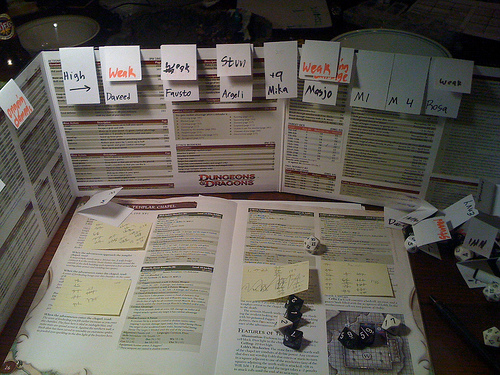
No more Oooh, who’s up. Me? Sorry. Hmm, what will I do, hmm…
Today, we’re gonna add some doors, and some more shadows. Doors can be found in many variations, but for this cellar, I will use a door and a doorframe that I’ve done a while back.
One of the major things with FilterForge is that you try and test, and sometimes you realize that a choice you made is not the optimal, then you have to rethink, like I have done. The path is to narrow for my taste, and cannot be wide enough, so we’re gonna change the curve component that is used as a generator for the path.
OK, now we’re gonna add some more selectable path textures, but first. we’re gonna set the correct Height input for the sand, as now it looks somewhat wrong.
More mapping today, fixing the stairs in the cellar, and start to add some shadows.
first, I render a piece of the map in Dundjinni, plain without grid or walls, to get a piece that matches our stairs on the ground floor. Read more
You still here? Good.
Now, this is called forest path, but so far we’ve only been doing the forest part of it. Now it is time to do the path, and my idea is that we should have the ability to render with or without a path or trail, and have to possibility to choose from several different types of path, sand, dirt or stone.
Na nana nana nananana na Texture time!
Textures needs to tile, have a decent resolution and look like we want them to. Lets start with the walls, which are what is left of the ground when the cellar was dug out. I usually use a standard stone texture for that, either search for one at CGTextures, or more recently, render one in FilterForge.
Good to be back for some good old mapmaking.
I think I will use OmniGraffle for this map, just to show you a different technique. OmniGraffle is not a map making software, but a pretty generic but very powerful object oriented drawing tool, for Mac OS X. I have no clue what you might use on Windows that works the same way?
This is how the cellar map looked in the original adventure.